
Search

Search by name or game type

Search results

Choose your language

Back to gamesReady to play

SnapGel

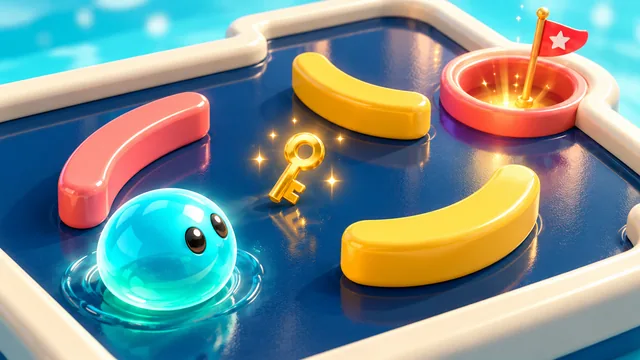
Launch, stick and recharge a glossy gel ball through 24 playful 3D puzzles.
SnapGel

Take a moment, find your rhythm and make your first move.

Music and sound start after your first tap. You can turn them on or off separately.

Your progress is saved in this browser. Changing language keeps your current round.

SnapGel — Game guide

Your goal

Guide a glossy gel ball through 24 3D puzzles. Set the direction and strength of each shot, collect the gold key and reach the goal cup. Use one sticky stop per charge, then refill on mint pads. Later levels add holes, slopes and moving bumpers.

Tips to try

  • Use a short pull near the key or cup. You can take another shot once the ball has stopped.
  • Plan where to use Stick before shooting. To recharge on the same mint pad, leave it and enter again.

Questions about the game

How does the Stick charge work?

You start with one charge. Tap Stick while the ball rolls to stop it immediately. Entering a mint pad refills the charge; staying on it does not refill it again.

Is there a limit on the number of shots?

No. You can keep shooting until you reach the cup with the key. Finishing in fewer shots earns more stars; a fall into a hole ends that attempt.

Zupleo

Help make Zupleo better

Found a problem or have an idea? Create a report, then share it with the maker yourself.

Include the steps needed to see the problem. Please leave out personal details.

This report has not been sent automatically.

Zupleo, one tap away

Add Zupleo to your home screen and open your games with one tap.

In your browser

  1. Look for an install icon in the address bar or an installation option in the browser menu. On a Mac, check the File menu as well.
  2. Choose Install app, Install this site as an app or Add to Dock, if available, and confirm.
  3. No installation option? You can save a bookmark and keep playing in your browser.

An internet connection is needed to play.

Share a little fun

Choose where to share. You decide who receives the link.

For Instagram or TikTok, use your device’s sharing menu or copy the link.

Read our privacy notice

Local speed test

Measurements stay on this page. Nothing is sent automatically. Copy or download a report when you choose.

Collecting locally

Close this panel, play a round, then reopen it to read the results. If the game is paused, choose Resume first.

Page loading

Navigation → first byte
Not available
HTML ready (DOMContentLoaded)
Not available
Load event
Not available
First visible content (FCP)
Not available
Largest content (LCP candidate)
Not available

Game start

Start a game to measure its loading and play.

Start request → ready
Not available
Ready → first game action
Not available
Ready → first practice action
Not available

Action times include reacting, thinking and any prior practice. They are not loading times. An interruption cancels unrecorded action times.

Game smoothness

Measured frames
Not available
Typical interval (median)
Not available
95% of intervals at or below
Not available
Longest interval
Not available
Intervals over 33.3 ms
Not available
Intervals over 50 ms
Not available

Latest 1,200 raw engine intervals during ordinary play. Pauses, hidden tabs and practice are excluded. The first interval after a break is skipped. Lower intervals are smoother; device refresh rate matters.

One local visit, not a Lighthouse or Core Web Vitals score. LCP is a native page candidate; INP and iframe content are not measured. Missing values are not zero.

Technical report